
| 일 | 월 | 화 | 수 | 목 | 금 | 토 |
|---|---|---|---|---|---|---|
| 1 | 2 | 3 | 4 | 5 | 6 | |
| 7 | 8 | 9 | 10 | 11 | 12 | 13 |
| 14 | 15 | 16 | 17 | 18 | 19 | 20 |
| 21 | 22 | 23 | 24 | 25 | 26 | 27 |
| 28 | 29 | 30 |
- #abc부트캠프 #유클리드소프트 #고용노동부 #대한상공회의소 #미래내일일경험사업
- #abc 프로젝트 멘토링 #유클리드소프트 #고용노동부 #대한상공회의소 #미래내일일경험사업 #공부일지 #멘토링일지
- Today
- Total
나른한 코딩 생활
[13일차] ABC 부트캠프 멜론 연간 TOP30 차트 추출 본문
오전에는 12일차에 각자가 원하는 유튜브 영상으로 만든 워드 클라우드를 발표하는 시간을 가졌다
다들 멋지고 좋은 색상으로 데이터 시각화를 진행하였다
해당 워드 클라우드는 다른 ABC 부트캠프 블로그 등을 통해 확인하면 좋을 것 같다
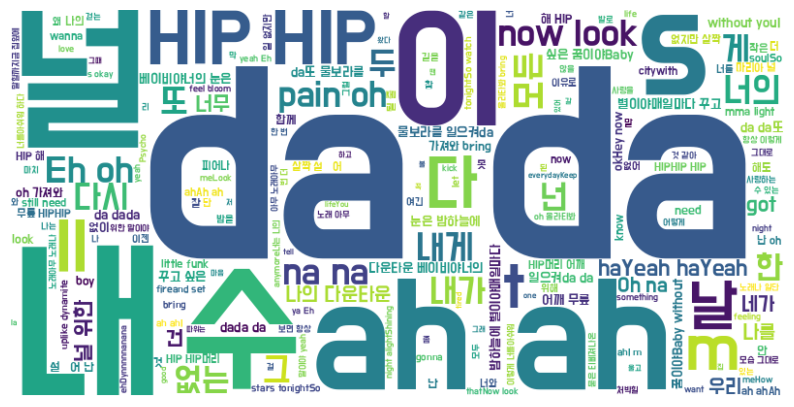
이후 오늘 작성할 코드는 특정 연도의 멜론차트 TOP30을 추출하여
워드 클라우드로 시각화 하는 작업까지 해보도록 하자
데이터 크롤링 및 csv 파일화
이번에는 2020년 멜론의 연간차트 데이터를 활용할 것이다.
https://www.melon.com/chart/age/index.htm?chartType=YE&chartGenre=KPOP&chartDate=2020
이번에 사용할 라이브러리들은 다음과 같다
rom selenium import webdriver
from webdriver_manager.chrome import ChromeDriverManager
from selenium.webdriver.chrome.service import Service as ChromeService
from selenium.webdriver.common.by import By
from bs4 import BeautifulSoup
import time

import pandas as pd
import re

from pytz import timezone
import datetime

import warnings
warnings.filterwarnings('ignore')
먼저 12일차와 동일하게 Chrome 탭에서 진행시킬 driver 와 service 변수를 설정한다.
options = webdriver.ChromeOptions()
options.add_argument('--no-sandbox') # 보안 기능인 샌드박스 비활성화
options.add_argument('--disable-dev-shm-usage') # dev/shm 디렉토리 사용 안함

service = ChromeService(executable_path=ChromeDriverManager().install())
driver = webdriver.Chrome(service= service,options=options)
이번에는 해당 과정을 함수화 시킨 다음에 크롤링 해보겠다.
이 과정을 통해 굳이 2020년이 아니더라도 설정한 년도를 통해 다른 데이터를 쉽게 가져올 수 있다.
함수의 이름은 melon_collector 라고 설정했다.
url 주소 또한 start 변수에 따라서 해당 연도의 데이터를 수집할 수 있도록 new_url 을 만들어 매개변수로 받는다
# 데이터 수집할 연도 설정
start = 2020

# 데이터 수집할 URL 주소 설정
url =  ('https://www.melon.com/chart/age/index.htm?chartType=YE&chartGenre=KPOP&chartDate=')
new_url = url + str(start)

melon_collector(new_url, start)
이후 함수 melon_collector 를 설정하면 끝이다
def melon_collector(url, start):
아래부터 마지막 코드구문을 제외한 모든 코드들은 함수 내의 코드이다.
먼저 srollTo 를 통해 동적 크롤링을 위한 사전 작업을 해보자
    print(str(start)+'년도 멜론 TOP30 수집 시작 ---------------')
    driver.get(url)
    time.sleep(3)

    driver.execute_script('window.scrollTo(0,1300)')
    time.sleep(3)
    # 이후 script timeout
url을 받아온 후 아래로 1300만큼 스크롤 한다.
    # 데이터 수집 시작
    html_source = driver.page_source
    soup = BeautifulSoup(html_source,'html.parser')

    # 노래 제목 30개 추출
    titles = driver.find_elements(By.CSS_SELECTOR,'.ellipsis.rank01')
    # CSS_SELECTOR 를 사용하여 조건을 여러개 붙혀야 헷갈리지 않고 원하는 정보를 찾을 수 있다.
    title_list = [title.text for title in titles][0:30]

    # 가수 30개 추출
    singers = driver.find_elements(By.CSS_SELECTOR,'.ellipsis.rank02')
    singer_list = [singer.text for singer in singers][0:30]

    # 가사 수집을 위한 songid 추출 준비
    song_info = soup.find_all('div',{'class': 'ellipsis rank01'})
    songid_list = []
이후 본격적인 데이터 수집을 위해 html 및 soup 를 설정
class 명으로 명시되어 있지 않기 때문에 div class 에서 elements 요소를 선택해야 했다
div 아래의 ellipsis rank01 요소들을 수집해야 하는데 코드에서 이를 작성할때는
점을 찍어 띄어쓰기를 이어줘야 한다.
'ellipsis rank01' -> '.ellipsis.rank01'
가수 30개를 추출하기 위한 구문도 이와 동일하게 작성해주고 둘 다 리스트화 시켜 _list 변수에 저장한다.
    # javascript:melon.play.playSong('19070207','32313543')
    # songid 추출
    for sid in song_info[:30]:
        try :
            info = re.sub('[^0-9]','', sid.find('a')['href'].split(',')[1]) # 'a' 는 어트리뷰트의 약어
        # 자바 스크립트를 , 뒤의 '3231~ 인덱스 1번 자리만 사용
            print(info)
            songid_list.append(info)
        except:
            songid_list.append('')
            print('song_not_found...')
            pass
가사를 얻기 위해서는 곡 정보를 클릭 후 해당 페이지로 이동해야 하는데
이 작업을 하기 전에 먼저 각 곡의 id 를 추출하는 작업을 거쳐야 한다.
songid 는 javascript:melon~ 의 형태로 작성되어 있는데 이 중 끝은 숫자코드가 곡 정보이다.
try except 구문을 사용하여 혹시 songid 가 없을 경우 빈 요소를 append 후 넘어가도록 하였다.
# 가사 수집
    song_cnt = 0
    lyrics_list = []
    for sing_id in songid_list:
        if sing_id:
            print(str(song_cnt+1) + ' : ' + title_list[song_cnt] + ' 노래 가사 수집 중 ...')
            song_cnt += 1
            # 곡 정보 페이지 이동
            song_url = f'https://www.melon.com/song/detail.htm?songId={sing_id}'
            driver.get(song_url)
            time.sleep(3)

            # 펼치기 버튼 클릭
            driver.find_element(By.CSS_SELECTOR,'.button_more.arrow_d').click()
            time.sleep(3)

            # 가사 수집
            html_source = driver.page_source
            song_soup = BeautifulSoup(html_source,'html.parser')
            # 현재 페이지를 다시 읽어들임

            lyric = song_soup.select_one('.lyric')
            if lyric:
                lyric = str(lyric).replace('<br/>',' ')
                cleaner = re.compile('<.*?>') #html 태그 정규식
                clean_lyric = re.sub(cleaner, '', lyric)
                clean_lyric = re.sub('\s+', ' ',clean_lyric)

                lyrics_list.append(clean_lyric)

                #lyrics_list.append(re.sub('\s+',' ',lyric.get_text()))
                # \s+ -> 하나 이상의 space, tab 찾기
            else:
                lyrics_list.append('')
본격적인 가사 수집을 위한 코드 이다.
봐야 할 부분은 driver.find_element 의 펼치기 버튼 클릭 부분이다.
이는 click() 함수를 사용하여 가사를 펼쳐(클릭) 전문을 크롤링 할 수 있도록 하는 기능이다.
if lyrice : 구문에서는 각종 띄어쓰기, 문단 등을 replace / compile 함수를 통해 바꾸는 동작을 한다.
else 를 통해 가사가 없을 경우 리스트에 빈 요소를 추가한다.
여기까지 완성했다면 이제 csv 파일화 하면 완성
완성된 코드는 아래와 같다
'''
멜론 차트  링크
https://www.melon.com/chart/age/index.htm?chartType=YE&chartGenre=KPOP&chartDate=2020

데이터 수집 순서
1. 연도 선택 -> 해당 연도 페이지 이동 -> 연간차트 1~30위 까지 노래 제목, 가수 정보 수집-> 각 노래 가사 수집
2. 각 노래 가사 수집 -> 곡 정보 페이지 이동 -> 노래 가사  화면의 펼치기 버튼 클릭 -> 가사 수집
3. csv 파일로 저장

soup 과 find 의

driver 는 액션을 하기 위해 find 를 사용
soup 은 정보만 얻기 위해 find 를 사용
물론 driver는 정보찾기도 가능하다

'''

from selenium import webdriver
from webdriver_manager.chrome import ChromeDriverManager
from selenium.webdriver.chrome.service import Service as ChromeService
from selenium.webdriver.common.by import By
from bs4 import BeautifulSoup
import time

import pandas as pd
import re

from pytz import timezone
import datetime

import warnings
warnings.filterwarnings('ignore')

options = webdriver.ChromeOptions()
options.add_argument('--no-sandbox') # 보안 기능인 샌드박스 비활성화
options.add_argument('--disable-dev-shm-usage') # dev/shm 디렉토리 사용 안함

service = ChromeService(executable_path=ChromeDriverManager().install())
driver = webdriver.Chrome(service= service,options=options)

def melon_collector(url, start):

    print(str(start)+'년도 멜론 TOP30 수집 시작 ---------------')
    driver.get(url)
    time.sleep(3)

    driver.execute_script('window.scrollTo(0,1300)')
    time.sleep(3)
    # 이후 script timeout


    # 데이터 수집 시작
    html_source = driver.page_source
    soup = BeautifulSoup(html_source,'html.parser')

    # 노래 제목 30개 추출
    titles = driver.find_elements(By.CSS_SELECTOR,'.ellipsis.rank01')
    # CSS_SELECTOR 를 사용하여 조건을 여러개 붙혀야 헷갈리지 않고 원하는 정보를 찾을 수 있다.
    title_list = [title.text for title in titles][0:30]

    # 가수 30개 추출
    singers = driver.find_elements(By.CSS_SELECTOR,'.ellipsis.rank02')
    singer_list = [singer.text for singer in singers][0:30]

    # 가사 수집을 위한 songid 추출 준비
    song_info = soup.find_all('div',{'class': 'ellipsis rank01'})
    songid_list = []

    # javascript:melon.play.playSong('19070207','32313543')
    # songid 추출
    for sid in song_info[:30]:
        try :
            info = re.sub('[^0-9]','', sid.find('a')['href'].split(',')[1]) # 'a' 는 어트리뷰트의 약어
        # 자바 스크립트를 , 뒤의 '3231~ 인덱스 1번 자리만 사용
            print(info)
            songid_list.append(info)
        except:
            songid_list.append('')
            print('song_not_found...')
            pass


    # 가사 수집
    song_cnt = 0
    lyrics_list = []
    for sing_id in songid_list:
        if sing_id:
            print(str(song_cnt+1) + ' : ' + title_list[song_cnt] + ' 노래 가사 수집 중 ...')
            song_cnt += 1
            # 곡 정보 페이지 이동
            song_url = f'https://www.melon.com/song/detail.htm?songId={sing_id}'
            driver.get(song_url)
            time.sleep(3)

            # 펼치기 버튼 클릭
            driver.find_element(By.CSS_SELECTOR,'.button_more.arrow_d').click()
            time.sleep(3)

            # 가사 수집
            html_source = driver.page_source
            song_soup = BeautifulSoup(html_source,'html.parser')
            # 현재 페이지를 다시 읽어들임

            lyric = song_soup.select_one('.lyric')
            if lyric:
                lyric = str(lyric).replace('<br/>',' ')
                cleaner = re.compile('<.*?>') #html 태그 정규식
                clean_lyric = re.sub(cleaner, '', lyric)
                clean_lyric = re.sub('\s+', ' ',clean_lyric)

                lyrics_list.append(clean_lyric)

                #lyrics_list.append(re.sub('\s+',' ',lyric.get_text()))
                # \s+ -> 하나 이상의 space, tab 찾기
            else:
                lyrics_list.append('')


        else:
            lyrics_list.append('')

    crwaling_date = datetime.datetime.now(timezone('Asia/Seoul')).strftime('%Y%m%d')

    df = pd.DataFrame({'노래제목':title_list,'가수':singer_list,'가사':lyrics_list})
    df.to_csv(f'멜론_Top30_{start}년_{crwaling_date}.csv',index=False,encoding='utf-8-sig')

    print(f'멜론 {start}년 TOP30 수집 완료.....')
    driver.close()


# 데이터 수집할 연도 설정
start = 2020

# 데이터 수집할 URL 주소 설정
url =  ('https://www.melon.com/chart/age/index.htm?chartType=YE&chartGenre=KPOP&chartDate=')
new_url = url + str(start)

melon_collector(new_url, start)
노래 정보 시각화
# 라이브러리 install 및 import
!pip install koreanize-matplotlib

import pandas as pd

from google.colab import files
from collections import Counter
import re
import plotly.express as px

from wordcloud import WordCloud
import matplotlib.pyplot as plt
import koreanize_matplotlib
df = pd.read_csv('/content/drive/MyDrive/ABC BootCamp/멜론_Top30_2020년_20240710.csv',encoding='utf-8-sig')
# 불용어 리스트
stopwords = ['은','는','이','가','으로','에','그','어', 'a','the','an','i']
def remove_stopwords(words):
return [word for word in words if word not in stopwords]
# 가사에 단어 추출
# 1) 데이터 프레임 불러오기
df = pd.read_csv('/content/drive/MyDrive/ABC BootCamp/멜론_Top30_2020년_20240710.csv')
# 2) 가사 컬럼만 모두 하나의 문자열로 합치기
all_lyrics = ' '.join(df['가사'])
# 3) 단어 추출
# 가사 뭉치에서 단어를 추출하고, 단어의 빈도를 계산
# \b 는 word boundary 의 약어 , 단어의 시작과 끝에 있는 문자로 매칭
# \w 는 word 의 약자 , 알파벳, 숫자, _ 문자를 찾기[0-9Aa-Zzㄱ-ㅎ]
words = re.findall(r'\b\w+\b',all_lyrics.lower())
# 4) 불용어 처리
words = remove_stopwords(words)
불용어 리스트인 stopwords 리스트 변수 안에는 여러가지 조사가 들어가있다.
이를 통해 해당 단어들이 시각화 할때 나타나지 않도록 하였다. -> remove_stopwords 함수 설정
이후 가사를 추출하고 불용어 처리까지 완료한다.
word_freq = Counter(words)
# 단어 상위 빈도수 20개 정보 추출
top_words = [word for word, freq in word_freq.most_common(20)] #단어
top_freqs = [freq for word, freq in word_freq.most_common(20)] #개수
이렇게 Counter를 이용하여 빈도수 기준 상위 20개의 단어를 추출하고 이를 시각화 해보자
# 워드 클라우드 시각화
wc = WordCloud(background_color='white', width=800, height=400,font_path='/content/font').generate(all_lyrics)
plt.figure(figsize=(10,6))
plt.imshow(wc, interpolation='bilinear')
plt.axis('off')
plt.show()
'ABC 부트캠프' 카테고리의 다른 글
| [15일차] ABC 부트캠프 취업역량강화 (1) | 2024.07.14 |
|---|---|
| [14일차] ABC 부트캠프 이미지 크롤링 (0) | 2024.07.13 |
| [12일차] ABC 부트캠프 유튜브 댓글 크롤링 (5) | 2024.07.10 |
| [11일차] ABC 부트캠프 데이터 크롤링 실전 (1) | 2024.07.09 |
| [10일차] ABC 부트캠프 ESG포럼&세미나 (0) | 2024.07.07 |


