
Notice
Recent Posts
Recent Comments
Link
| 일 | 월 | 화 | 수 | 목 | 금 | 토 |
|---|---|---|---|---|---|---|
| 1 | 2 | 3 | 4 | 5 | 6 | |
| 7 | 8 | 9 | 10 | 11 | 12 | 13 |
| 14 | 15 | 16 | 17 | 18 | 19 | 20 |
| 21 | 22 | 23 | 24 | 25 | 26 | 27 |
| 28 | 29 | 30 |
Tags
- #abc부트캠프 #유클리드소프트 #고용노동부 #대한상공회의소 #미래내일일경험사업
- #abc 프로젝트 멘토링 #유클리드소프트 #고용노동부 #대한상공회의소 #미래내일일경험사업 #공부일지 #멘토링일지
Archives
- Today
- Total
나른한 코딩 생활
[16일차] ABC 부트캠프 데이터 수집 시각화 조별 발표 본문
이번 시간에는 각 조별 자유주제를 발표하는 시간으로 장황했던 데이터 수집 파트를 마무리할 에정이다
정말 좋은 발표주제와 멋진 프레젠테이션이 있었으나, 이에 대한 자세한 기술은 다른 조에서 할 것이다
우리 조에서 발표했던 ' 국민 청원 데이터 분석 - 국민의 목소리 ' 에 대해 알아보겠다
국민동의청원 사이트 크롤링
먼저 해당 사이트에서 동의수 현황을 파악할 수 있기에 청원24 대신 위 사이트를 선택했으나
교수님 말씀으로는 크롤링을 막기 위한 사이트 같다 하셨다
그렇기에 크롤링할 수 있는 자료가 한정적이였고 생각 이상으로 시간을 많이 썼다
from selenium import webdriver
from webdriver_manager.chrome import ChromeDriverManager
from selenium.webdriver.chrome.service import Service as ChromeService
from selenium.webdriver.common.by import By
from selenium.webdriver.support.ui import WebDriverWait
from selenium.webdriver.support import expected_conditions as EC
from bs4 import BeautifulSoup
import time
import os

import pandas as pd
import re

from pytz import timezone
import datetime

import warnings
warnings.filterwarnings('ignore')

options = webdriver.ChromeOptions()
options.add_argument('--no-sandbox')    # 보안 기능인 샌드박스 비활성화
options.add_argument('--disable-dev-shm-usage') # dev/shm 디렉토리 사용안함.
# 이 2가지 세팅을 하지 않으면, 크롬 브라우저를 못 엶. 그래서 막는 것임

service = ChromeService(executable_path=ChromeDriverManager().install())
driver = webdriver.Chrome(service=service, options=options)

driver.get('https://petitions.assembly.go.kr/closed/established')
driver.implicitly_wait(10)  # 화면 랜더링 기다리기

# 데이터들을 담을 리스트 선언 / 기관명, 제목, 추천수, 날짜
institutional_list = []
title_list = []
recommend_list = []
date_list = []

try:
    while True:
        # 페이지 데이터 추출
        soup = BeautifulSoup(driver.page_source, 'html.parser')

        # 필요한 데이터 추출
        petitions = soup.select('div.ListDiv > ul > li')
        for petition in petitions:
            institutional = petition.select_one('dt').text.strip()
            title = petition.select_one('dd').text.strip()

            # 추천수 추출
            recommend_element = petition.select_one('p.hidden')
            if recommend_element:
                recommend_text = recommend_element.next_sibling.strip()
                recommend = re.sub(r'[^\d]', '', recommend_text)  # 숫자 이외의 문자 제거
            else:
                recommend = 'N/A'  # 데이터가 없을 경우 기본값 설정

            # 날짜 추출 (span 태그 제외)
            date_element = petition.select_one('div.agreeDate dd')
            if date_element:
                # span 태그 제거 후 텍스트 추출
                for span in date_element.find_all('span'):
                    span.decompose()
                date_text = date_element.text.strip().replace(' ~', '')
            else:
                date_text = 'N/A'  # 데이터가 없을 경우 기본값 설정

            institutional_list.append(institutional)
            title_list.append(title)
            recommend_list.append(recommend)
            date_list.append(date_text)

            #print(f"기관 명: {institutional}, 제목: {title}, 추천수: {recommend}, 날짜: {date_text}")

        # '다음' 버튼이 있는 <li> 요소를 찾기
        next_button_li = WebDriverWait(driver, 10).until(
            EC.presence_of_element_located((By.XPATH, "//li[a[contains(text(), '다음')]]"))
        )

        # '다음' 버튼이 비활성화되어 있으면 루프 종료
        if 'disabled' in next_button_li.get_attribute('class'):
            print("마지막 페이지라 다음 버튼을 누를 수 없으므로 종료")
            break

        # '다음' 버튼 클릭
        next_button = next_button_li.find_element(By.LINK_TEXT, '다음')
        driver.execute_script("arguments[0].click();", next_button)
        print('다음 버튼 누르기')

        # 페이지 로딩 대기
        time.sleep(3)

except Exception as e:
    print(f"오류 발생: {e}")

finally:
    # 데이터 프레임으로 변환
    df = pd.DataFrame({
        'Institutional': institutional_list,
        'Title': title_list,
        'Recommend': recommend_list,
        'Date': date_list
    })

    # 데이터 프레임 출력
    print(df.head())
    print('\n--------------\n')
    print(df.tail())

    # 원하는 디렉토리 경로 (예: 현재 디렉토리 내의 "data" 폴더)
    output_dir = os.path.join(os.getcwd(), 'data')
    os.makedirs(output_dir, exist_ok=True)  # 디렉토리가 없으면 생성

    # 파일 경로
    crwaling_date = datetime.datetime.now(timezone('Asia/Seoul')).strftime('%Y%m%d')
    file_path = os.path.join(output_dir, f"성립된 청원 2022-07-13 ~ 2024-07-13_{crwaling_date}.csv")

    # CSV 파일 저장
    df.to_csv(file_path, index=False, encoding='utf-8-sig')
    print(f"{file_path} 저장이 완료 . . .")
    driver.close()
위 작업을 통해 성립된 청원.csv & 미성립된 청원.csv 두 가지의 크롤링 자료를 가지고 작업을 시작했다
코랩에서 데이터 시각화 - 성립된 성원
라이브러리 인스톨 과정
!pip install koreanize-matplotlib
!pip install konlpy
import plotly.express as px
import pandas as pd
from google.colab import files
from collections import Counter
import re
import seaborn as sns
import matplotlib.pyplot as plt
import koreanize_matplotlib
from wordcloud import WordCloud
from datetime import datetime
import konlpy데이터 전처리
df = pd.read_csv('/content/성립된 청원 2022-07-13 ~ 2024-07-13_20240713.csv')

# 데이터 복사본 만들기
petition_df = df.copy()

# 누락 데이터 추가
first_half_2022 = [{'Institutional': '정치/선거/국회운영', 'Title': '공직선거법 개정에 관한 청원' , 'Recommend': 50000, 'Date':datetime(2022, 1, 5)  }, # 1
                   {'Institutional': '인권/성평등/노동', 'Title': '인권정책기본법안 제정 반대에 관한 청원' , 'Recommend':50000, 'Date':datetime(2022, 2, 17)  }, # 2
                   {'Institutional':'인권/성평등/노동' , 'Title': '포괄적 차별금지법을 우회 입법하려는 국가인권위원회법 개정안 반대에 관한 청원' , 'Recommend':50000, 'Date':datetime(2022, 2, 22)  }, # 3
                   {'Institutional': '수사/법무/사법제도', 'Title': '윤석열 당선자의 대장동 부산저축은행 부실수사 봐주기 의혹과 김건희의 주가조작 실체의 진상조사 확인을 위한 특검 요청에 관한 청원' , 'Recommend':50000, 'Date':datetime(2022, 3, 28)  }, # 4
                   {'Institutional': '산업/통상', 'Title': '전력 판매 시장 민간 개방 반대를 위한 전기사업법 개정에 관한 청원' , 'Recommend':50000, 'Date':datetime(2022, 5, 2)  }, # 5
                   {'Institutional': '행정/지방자치', 'Title': '여상가족부 폐지에 반대에 관한 청원' , 'Recommend':50000, 'Date':datetime(2022, 4, 8)  }, # 6
                   {'Institutional': '수사/법무/사법제도', 'Title': '중대범죄수사청 입법 조치 및 발족 시한의 법제화에 관한 청원', 'Recommend':50000, 'Date':datetime(2022, 4, 26)  }, # 7
                   {'Institutional': '행정/지방자치', 'Title': '여성가족부 폐지 찬성 및 동의에 관한 청원' , 'Recommend':50000, 'Date':datetime(2022, 5, 18)  }, # 8
                   {'Institutional': '인권/성평등/노동', 'Title': '윤석열 당선자가 주장한 지역별, 업종별 최저임금 차등적용의 근거가 되는 최저임금법 제4조 조문 삭제 요청에 관한 청원' , 'Recommend':50000, 'Date':datetime(2022, 5, 2)  }, # 9
                   {'Institutional': '수사/법무/사법제도', 'Title': '동물은 물건이 아니다 민법 개정안 통과 촉구에 관한 청원' , 'Recommend':50000, 'Date':datetime(2022, 5, 23)  }] # 10
first_half_2022df = pd.DataFrame(first_half_2022)

petition_df = pd.concat([petition_df, first_half_2022df], ignore_index=True) # 코드 중복 실행시 데이터 계속 삽입됨
#petition_df.info() 로 중간정검 계속 해주기

# 명사 추출
title_text =  ' '.join(li for li in petition_df['Title'].astype(str))
komoran = konlpy.tag.Komoran()
title_nn = komoran.nouns(title_text)

# 불용어 처리하기
stopwords = ['등','것','간','수','위','간','투','청원']

def remove_stopwords(words):
  return [word for word in words if word not in stopwords]


words = remove_stopwords(title_nn)

# 빈도수 세서 데이터 프레임으로 만들기
word_count = Counter(words)
word_count.most_common(20)
word_count_df = pd.DataFrame(dict(word_count).items(), columns=['word', 'count'])
word_count_df = word_count_df.sort_values(by='count', ascending=False)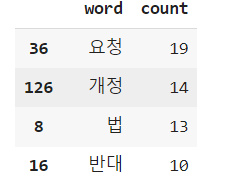
데이터 시각화
sorted_df = word_count_df.head(20).sort_values(by='count', ascending=True)

plt.figure(figsize=(10,6))
plt.barh(sorted_df['word'], sorted_df['count'])
plt.title('청원 단어 빈도 수 TOP20')
plt.xlabel('빈도수')
plt.ylabel('단어')
plt.grid(True)
plt.show()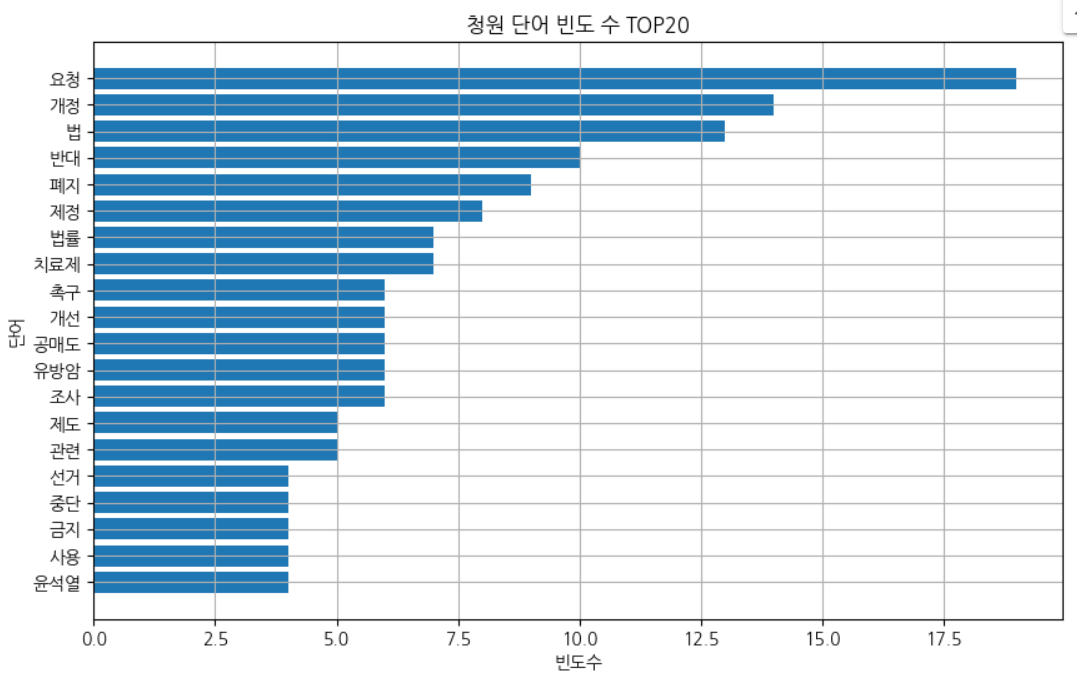
font_path = '/content/BMDOHYEON_ttf.ttf'

plt.subplots(figsize=(25,15))

wc = WordCloud(width = 500, height = 300, font_path=font_path).generate_from_frequencies(dict(word_count))

plt.axis('off')
plt.imshow(wc, interpolation='bilinear')
plt.show()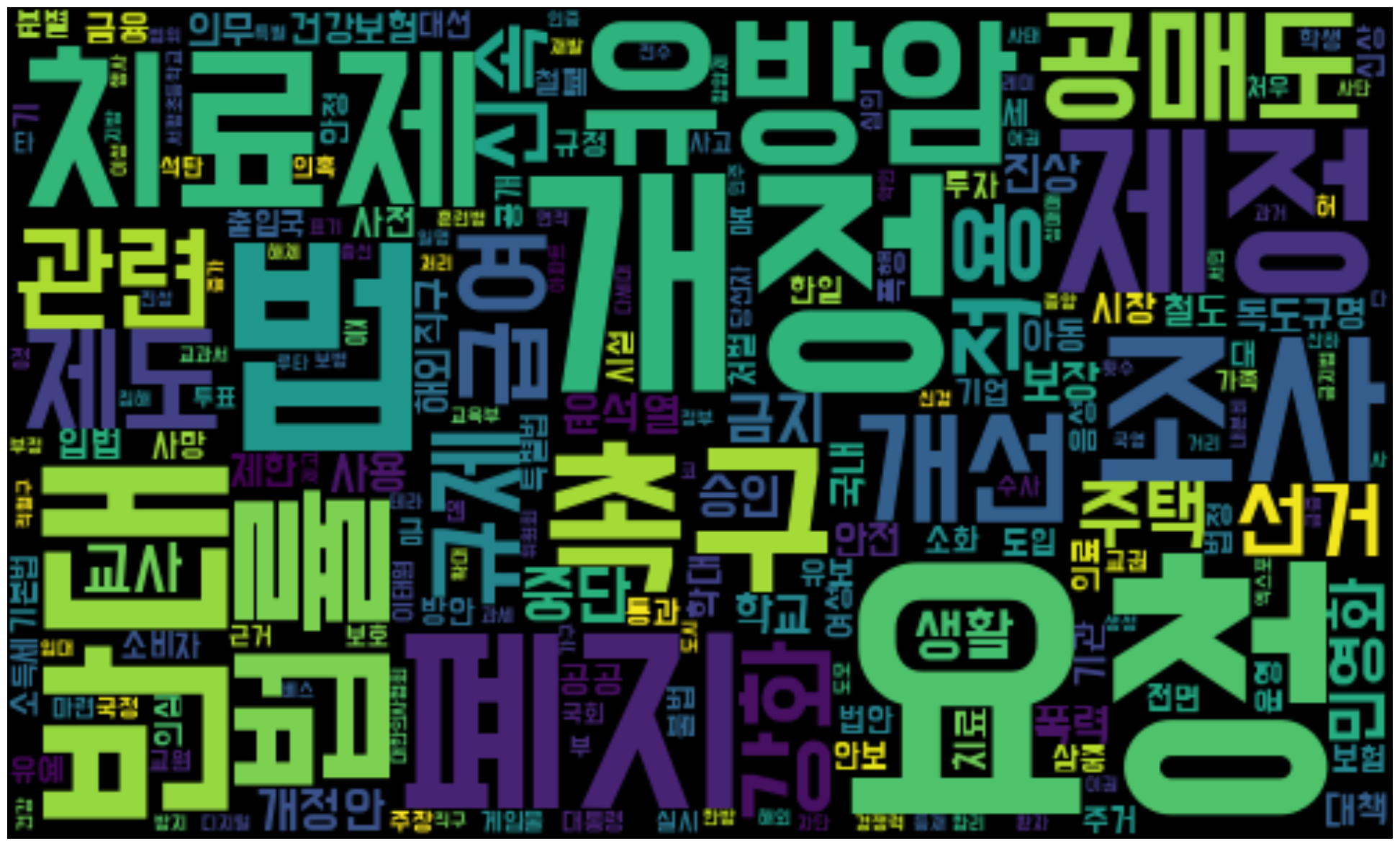
# Date 를 datetime 형식으로 변환 및 연도 / 월일 추출
petition_df['Date'] = pd.to_datetime(petition_df['Date'])
petition_df['Year'] = petition_df['Date'].dt.year
petition_df['MonthDay'] = petition_df['Date'].dt.strftime('%m-%d')

recom = petition_df.groupby(['Year', 'Institutional'],as_index=False).agg(Recom_Tag=('Recommend','sum'))
fig = px.bar(recom, x = 'Year',y = 'Recom_Tag',color='Institutional',barmode='group')
fig.show()
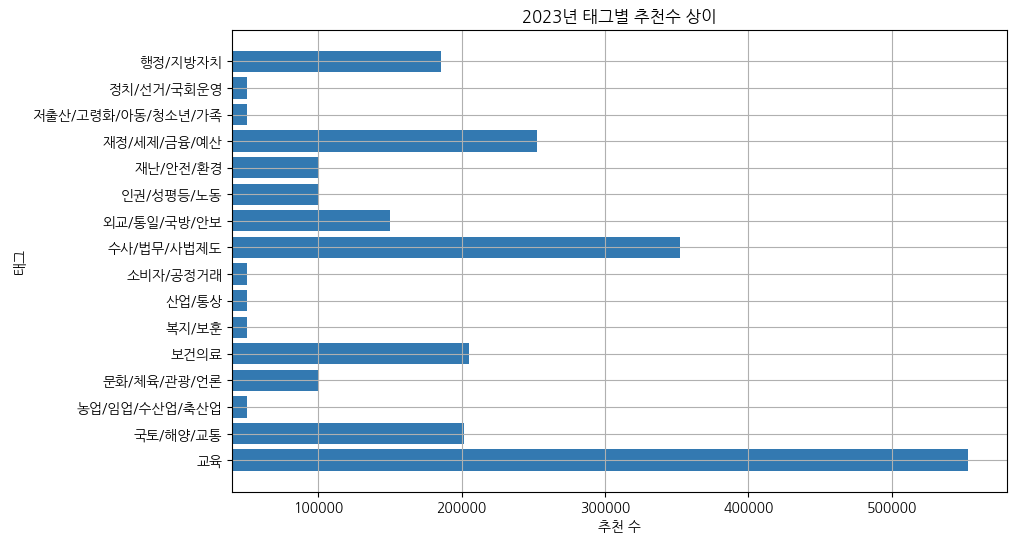
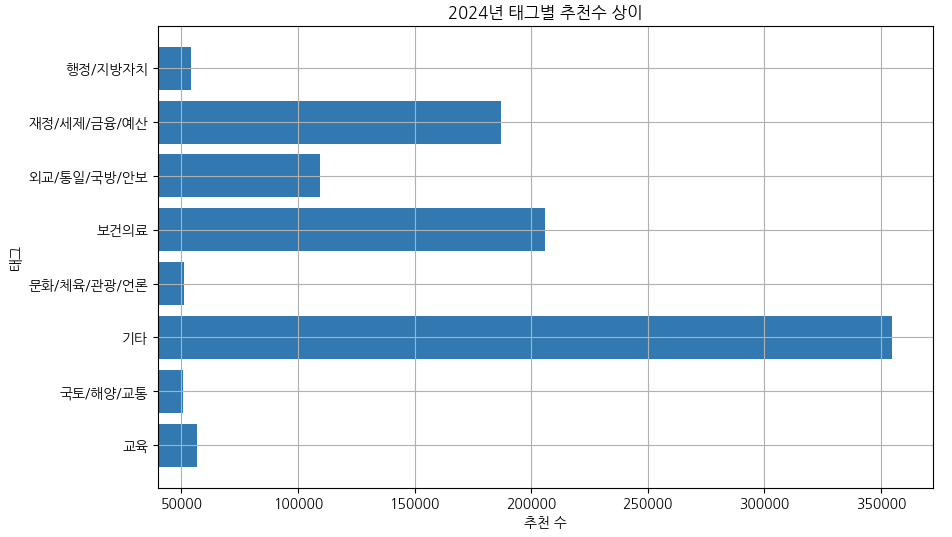
# 2022년 태그별 추천수 상이
plt.figure(figsize=(10, 6))
plt.barh(recom['Institutional'][0:9],recom['Recom_Tag'][0:9]) # barh -> 수직
plt.xlim(40000) # x축의 값 시작을 40000
plt.title('2022년 태그별 추천수 상이')
plt.xlabel('추천 수')
plt.ylabel('태그')
plt.grid(True)
plt.show()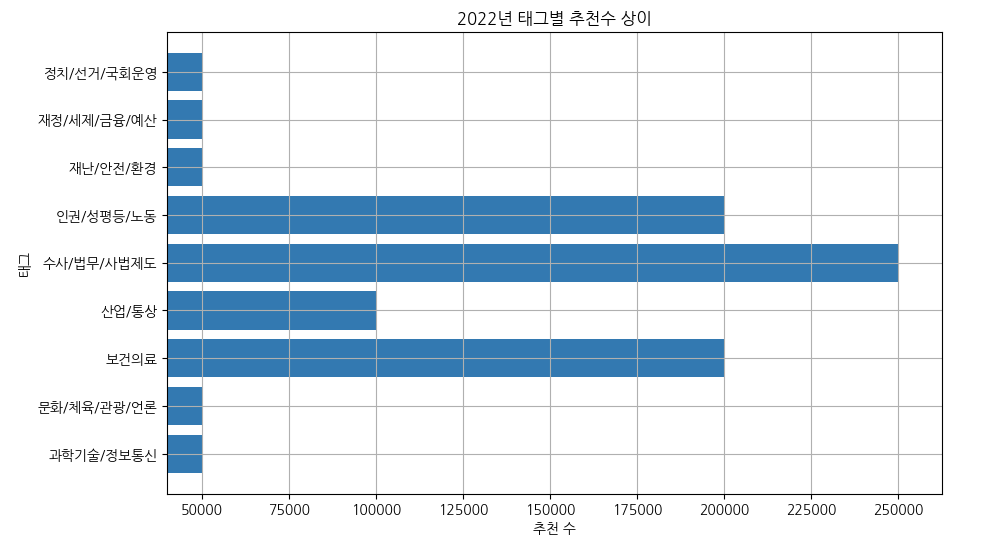
recom_ac_with_Tag = recom.sort_values(by='Recom_Tag', ascending=False)
# 카테고리 별 추천수 합

# 상위 5개 데이터 추출
recom['Year'] = pd.to_datetime(recom['Year'], format='%Y')
budget_recom = recom[recom['Institutional'] == '재정/세제/금융/예산']
edu_recom = recom[recom['Institutional'] =='교육']
invest_recom = recom[recom['Institutional']=='수사/법무/사법제도']
medic_recom = recom[recom['Institutional']=='보건의료']
etc_recom = recom[recom['Institutional']=='기타']

plt.figure(figsize=(12, 8))

plt.plot(budget_recom['Year'],budget_recom['Recom_Tag'],marker='o',label = '재정/세제/금융/예산')
plt.plot(edu_recom['Year'],edu_recom['Recom_Tag'],marker='o',label = '교육')
plt.plot(invest_recom['Year'],invest_recom['Recom_Tag'],marker='o',label = '수사/법무/사법제도')
plt.plot(medic_recom['Year'],medic_recom['Recom_Tag'],marker='o',label = '보건의료')
plt.plot(etc_recom['Year'],etc_recom['Recom_Tag'],marker='o',label = '기타')


plt.xticks(pd.to_datetime(['2022', '2023', '2024'], format='%Y'))
plt.gca().xaxis.set_major_formatter(plt.matplotlib.dates.DateFormatter('%Y'))

plt.title('연도별 Tag의 Recommend 추이')
plt.xlabel('Tag')
plt.ylabel('Recommend')
plt.legend()
plt.tight_layout()
plt.show()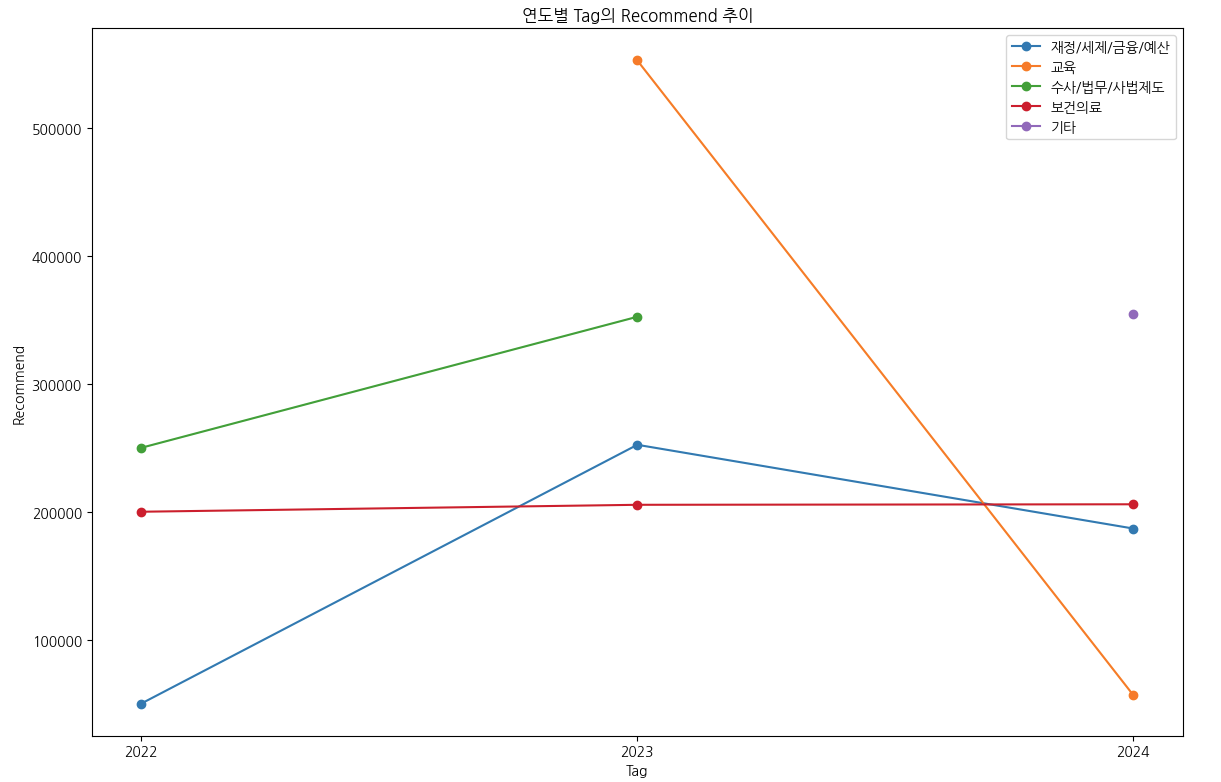
# 2022 키워드 추출
keyword_2022 = petition_df[petition_df['Year'] == 2022]
keyword_2022_text =  ' '.join(li for li in keyword_2022['Title'].astype(str))
komoran = konlpy.tag.Komoran()
keyword_2022_nn = komoran.nouns(keyword_2022_text)

# 2023 키워드 추출
keyword_2023 = petition_df[petition_df['Year'] == 2023]
keyword_2023_text =  ' '.join(li for li in keyword_2023['Title'].astype(str))
komoran = konlpy.tag.Komoran()
keyword_2023_nn = komoran.nouns(keyword_2023_text)

# 2024 키워드 추출
keyword_2024 = petition_df[petition_df['Year'] == 2024]
keyword_2024_text =  ' '.join(li for li in keyword_2024['Title'].astype(str))
komoran = konlpy.tag.Komoran()
keyword_2024_nn = komoran.nouns(keyword_2024_text)

# 불용어 처리하기
stopwords = ['등','것','간','수','위','간','투','청원','부','세','대']

def remove_stopwords(words):
  return [word for word in words if word not in stopwords]

keyword_2022_nn = remove_stopwords(keyword_2022_nn)
keyword_2023_nn = remove_stopwords(keyword_2023_nn)
keyword_2024_nn = remove_stopwords(keyword_2024_nn)
# 빈도수 세서 데이터 프레임으로 만들기
keyword_2022_count = Counter(keyword_2022_nn)
keyword_2022_count_df = pd.DataFrame(dict(keyword_2022_count).items(), columns=['word', 'count'])
keyword_2022_count_df = keyword_2022_count_df.sort_values(by='count', ascending=False)
keyword_2023_count = Counter(keyword_2023_nn)
keyword_2023_count_df = pd.DataFrame(dict(keyword_2023_count).items(), columns=['word', 'count'])
keyword_2023_count_df = keyword_2023_count_df.sort_values(by='count', ascending=False)
keyword_2024_count = Counter(keyword_2024_nn)
keyword_2024_count_df = pd.DataFrame(dict(keyword_2024_count).items(), columns=['word', 'count'])
keyword_2024_count_df = keyword_2024_count_df.sort_values(by='count', ascending=False)
# 예제 데이터프레임을 사용하여 각 연도의 데이터를 정렬
# 각 df는 각각의 연도 데이터프레임으로 가정
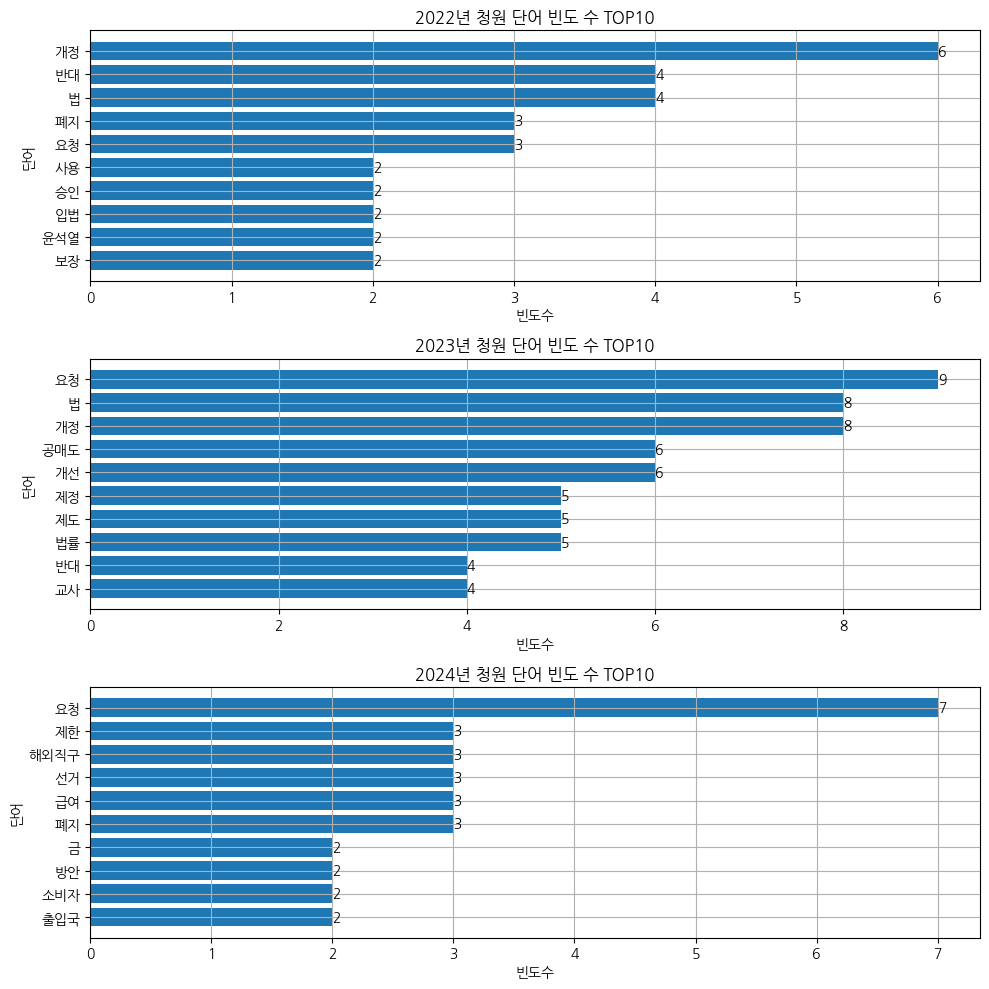
sorted_2022_df = keyword_2022_count_df.head(10).sort_values(by='count', ascending=True)
sorted_2023_df = keyword_2023_count_df.head(10).sort_values(by='count', ascending=True)
sorted_2024_df = keyword_2024_count_df.head(10).sort_values(by='count', ascending=True)
plt.figure(figsize=(10,10))
# 2022년 데이터 플롯
plt.subplot(3, 1, 1) # (행, 열, 위치)
plt.barh(sorted_2022_df['word'], sorted_2022_df['count'])
for index, value in enumerate(sorted_2022_df['count']):
plt.text(value, index, str(value), va='center')
plt.title('2022년 청원 단어 빈도 수 TOP10')
plt.xlabel('빈도수')
plt.ylabel('단어')
plt.grid(True)
# 2023년 데이터 플롯
plt.subplot(3, 1, 2)
plt.barh(sorted_2023_df['word'], sorted_2023_df['count'])
for index, value in enumerate(sorted_2023_df['count']):
plt.text(value, index, str(value), va='center')
plt.title('2023년 청원 단어 빈도 수 TOP10')
plt.xlabel('빈도수')
plt.ylabel('단어')
plt.grid(True)
# 2024년 데이터 플롯
plt.subplot(3, 1, 3)
plt.barh(sorted_2024_df['word'], sorted_2024_df['count'])
for index, value in enumerate(sorted_2024_df['count']):
plt.text(value, index, str(value), va='center')
plt.title('2024년 청원 단어 빈도 수 TOP10')
plt.xlabel('빈도수')
plt.ylabel('단어')
plt.grid(True)
plt.tight_layout()
plt.show()
# 이미지 파일 열기
icon_2022 = Image.open('/content/KakaoTalk_20240715_115416179_02.png')
icon_2023 = Image.open('/content/KakaoTalk_20240715_115416179_01.png')
icon_2024 = Image.open('/content/KakaoTalk_20240715_115416179.png')

# 이미지를 numpy 배열로 변환
image_2022 = np.array(icon_2022)
image_2023 = np.array(icon_2023)
image_2024 = np.array(icon_2024)

# 워드 클라우드 생성 함수
def generate_wordcloud(image, frequencies):
    wc = WordCloud(
        width=800,
        height=700,
        background_color='white',
        font_path='/content/BMDOHYEON_ttf.ttf',
        mask=image,
        stopwords=STOPWORDS
    ).generate_from_frequencies(frequencies)
    img_colors = ImageColorGenerator(image, default_color=(255,255,255))
    wc = wc.recolor(color_func=img_colors)
    return wc

# 서브플롯 생성
fig, axes = plt.subplots(1, 3, figsize=(25, 15))

# 2022년 워드 클라우드 생성 및 출력
wc_2022 = generate_wordcloud(image_2022, dict(keyword_2022_count))
axes[0].imshow(wc_2022, interpolation='bilinear')
axes[0].axis('off')
axes[0].set_title('2022년 청원 단어 빈도 수 워드 클라우드')

# 2023년 워드 클라우드 생성 및 출력
wc_2023 = generate_wordcloud(image_2023, dict(keyword_2023_count))
axes[1].imshow(wc_2023, interpolation='bilinear')
axes[1].axis('off')
axes[1].set_title('2023년 청원 단어 빈도 수 워드 클라우드')

# 2024년 워드 클라우드 생성 및 출력
wc_2024 = generate_wordcloud(image_2024, dict(keyword_2024_count))
axes[2].imshow(wc_2024, interpolation='bilinear')
axes[2].axis('off')
axes[2].set_title('2024년 청원 단어 빈도 수 워드 클라우드')

plt.tight_layout()
plt.show()
코랩에서 데이터 시각화 - 미성립된 성원
non_df = pd.read_csv('/content/수정2_미성립된 청원 2022-01-01 ~ 2024-07-13.csv')

# 데이터 복사본 만들기
non_petition_df = non_df.copy()

# 제목 추출
sec_title_text =  ' '.join(li for li in non_petition_df['Title'].astype(str))
komoran = konlpy.tag.Komoran()
sec_title_nn = komoran.nouns(sec_title_text)

# 불용어 처리하기
sec_stopwords = ['등','것','간','수','위','간','관한','청원']

def remove_stopwords(words, sec_stopwords):
  return [word for word in words if word not in sec_stopwords]

filtered_words = remove_stopwords(title_nn, sec_stopwords)

# 빈도수 세서 데이터 프레임으로 만들기
word_count2 = Counter(filtered_words)
word_count2.most_common(20)
word_count2_df = pd.DataFrame(dict(word_count2).items(), columns=['word', 'count'])
word_count2_df = word_count2_df.sort_values(by='count', ascending=False)

plt.subplots(figsize=(20,15))
word_count_df['count'] = word_count_df['count'].astype(int)
wc = WordCloud(width = 500, height = 300, font_path=font_path).generate_from_frequencies(dict(word_count2))
plt.imshow(wc, interpolation='bilinear')
plt.axis('off')
plt.show()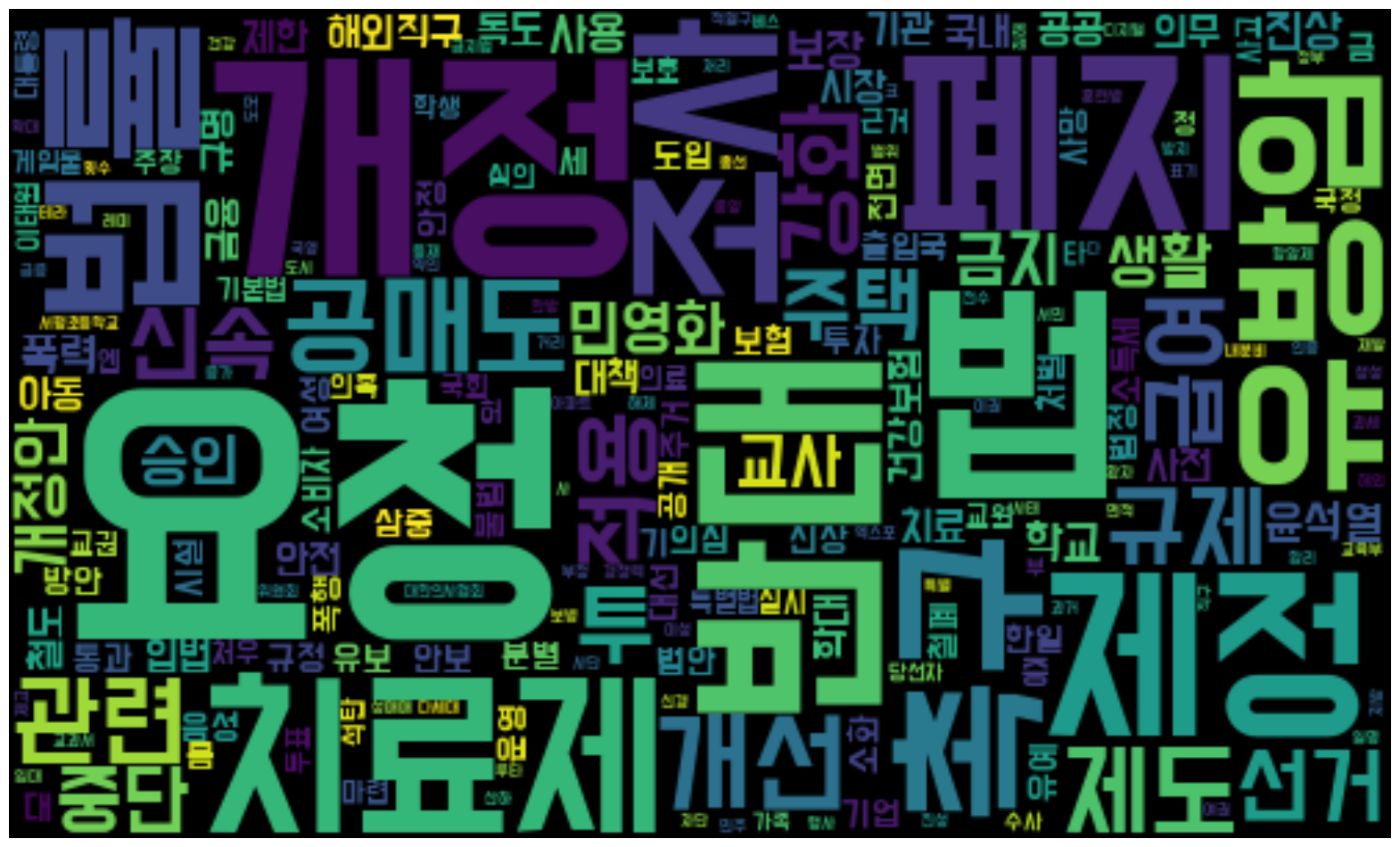
# Date 를 datetime 형식으로 변환 및 연도 / 월일 추출
non_petition_df['Date'] = pd.to_datetime(non_petition_df['Date'])
non_petition_df['Year'] = non_petition_df['Date'].dt.year
non_petition_df['MonthDay'] = non_petition_df['Date'].dt.strftime('%m-%d')

sec_recom = non_petition_df.groupby(['Year', 'Institutional'],as_index=False).agg(sec_Recom_Tag=('Recommend','sum'))

fig = px.bar(sec_recom, x = 'Year',y = 'sec_Recom_Tag',color='Institutional',barmode='group')
fig.show()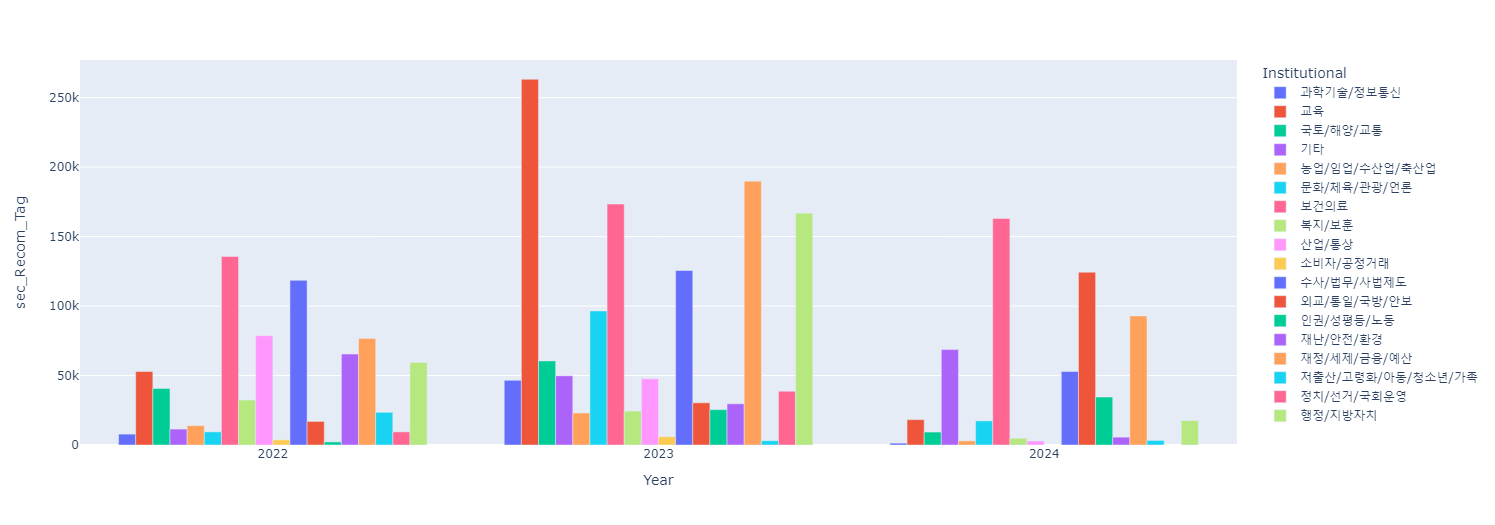
plt.figure(figsize=(10, 6))
plt.barh(sec_recom['Institutional'][0:10],sec_recom['sec_Recom_Tag'][0:10]) # barh -> 수직수직 # 0부터 9가 되기 전까지니깐 [0:10]이 맞지 않나?
plt.xlim(0)
plt.title('2022년 태그별 추천수 상이')
plt.xlabel('추천 수')
plt.ylabel('태그')
plt.grid(True)
plt.show()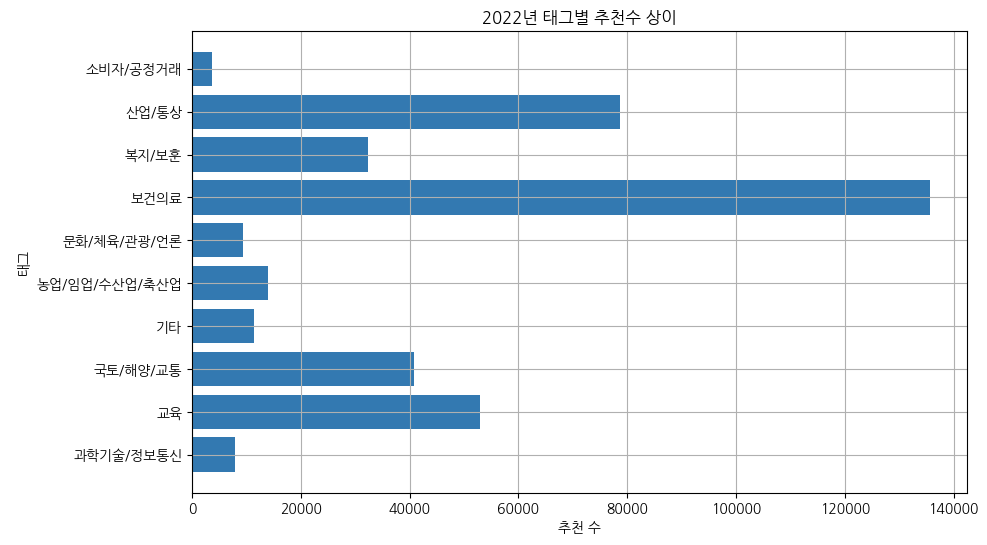

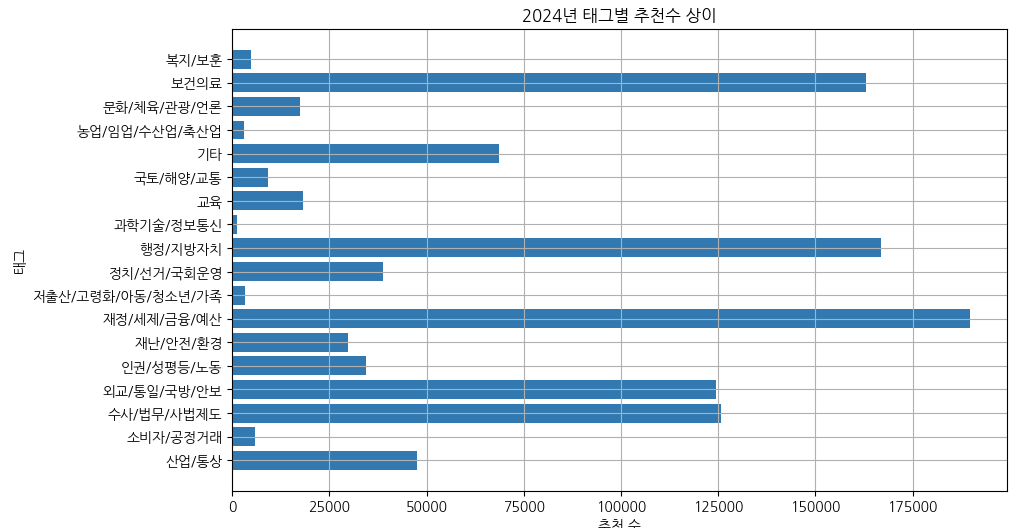
worst_request = non_petition_df[non_petition_df['Recommend'] < 300 ].sort_values(by='Recommend', ascending=False)
worst_request # 동의수 300 미만인 청원이 383개 / 전체 1009개 37.95%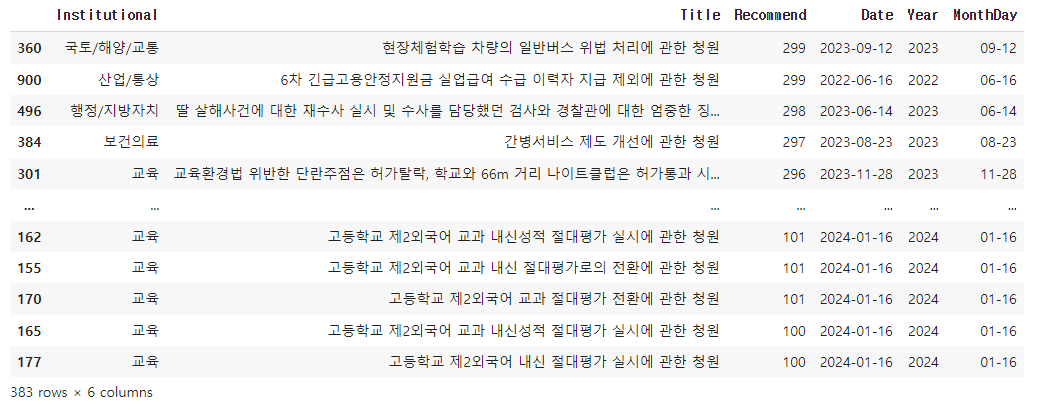
# 미성립 청원 중 동의수가 2만 이상인 것만 뽑기
recommend_non_df = non_df[non_df['Recommend'] >= 20000].sort_values(by='Recommend', ascending=False)
recommend_non_df.head(10)

# 막대그래프로 시각화 하기
sort_recommend = recommend_non_df.head(10).sort_values(by='Recommend', ascending=True)

plt.barh(sort_recommend['Title'], sort_recommend['Recommend'])
plt.title('미성립 청원 추천수')
plt.xlabel('추천수')
plt.ylabel('카테고리')

plt.grid(True)
plt.show()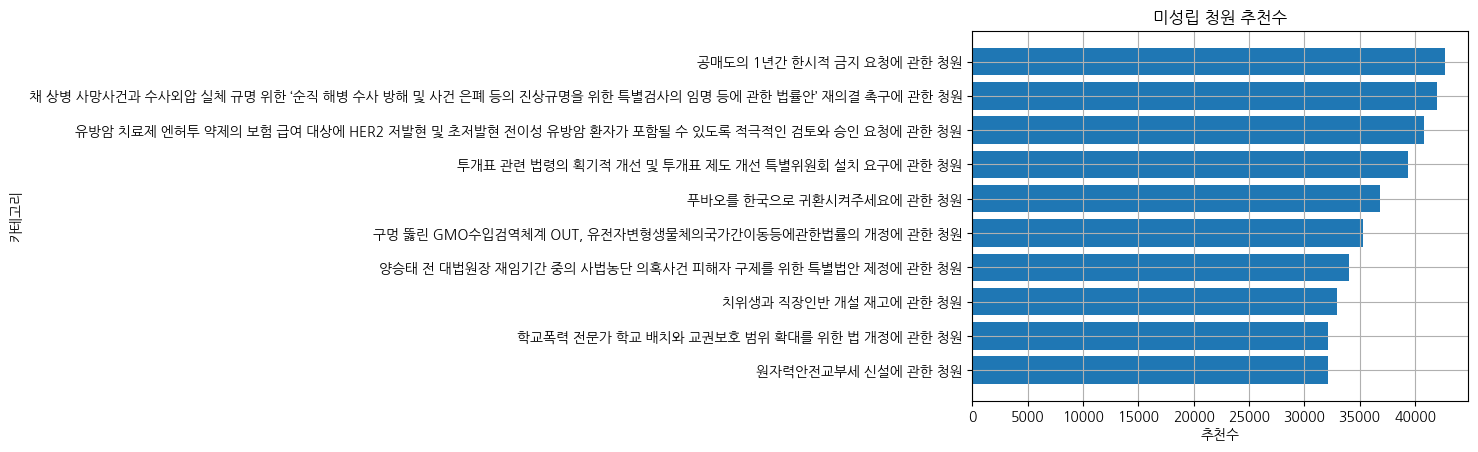
'ABC 부트캠프' 카테고리의 다른 글
| [18일차] ABC 부트캠프 선형회귀 (0) | 2024.07.21 |
|---|---|
| [17일차] ABC 부트캠프 빅데이터 분석 및 기초 통계 & 딥러닝 (4) | 2024.07.20 |
| [15일차] ABC 부트캠프 취업역량강화 (1) | 2024.07.14 |
| [14일차] ABC 부트캠프 이미지 크롤링 (0) | 2024.07.13 |
| [13일차] ABC 부트캠프 멜론 연간 TOP30 차트 추출 (0) | 2024.07.13 |
'ABC 부트캠프' Related Articles
more


