
Notice
Recent Posts
Recent Comments
Link
| 일 | 월 | 화 | 수 | 목 | 금 | 토 |
|---|---|---|---|---|---|---|
| 1 | 2 | 3 | 4 | 5 | 6 | |
| 7 | 8 | 9 | 10 | 11 | 12 | 13 |
| 14 | 15 | 16 | 17 | 18 | 19 | 20 |
| 21 | 22 | 23 | 24 | 25 | 26 | 27 |
| 28 | 29 | 30 |
Tags
- #abc부트캠프 #유클리드소프트 #고용노동부 #대한상공회의소 #미래내일일경험사업
- #abc 프로젝트 멘토링 #유클리드소프트 #고용노동부 #대한상공회의소 #미래내일일경험사업 #공부일지 #멘토링일지
Archives
- Today
- Total
나른한 코딩 생활
[21일차] ABC 부트캠프 퍼셉트론 & MLP 본문
저번시간 까지는 tensorflow, 즉 레이어가 한개인 머신러닝의 예제들을 풀어보았다
오늘은 지난시간에 한 예제의 마무리를 하고
이후, 다중 퍼셉트론인 MLP 와 퍼셉트론에 대해 알아보자
예제 - 닥스훈트 or 사모예드 ?
from matplotlib import pyplot as plt
import numpy as np
from sklearn.neighbors import KNeighborsClassifier

# Dachshund 의 길이와 높이로 만든 데이터
dachshund_length = [77, 78, 85, 83, 73, 77, 73, 80,]
dachshund_height = [25, 28, 29, 30, 21, 22, 17, 35,]
# Samoyed 의 길이와 높이로 만든 데이터
samoyed_length = [75, 77, 86, 86, 79, 83, 83, 88,]
samoyed_height = [56, 57, 50, 53, 60, 53, 49, 61,]
#%%
# 데이터 관계도를 화면에 출력
plt.scatter(x=dachshund_length, y=dachshund_height, c='c', marker='.')
plt.scatter(x=samoyed_length, y=samoyed_height, c='b', marker='*')
plt.xlabel('Heights')
plt.ylabel('Lengths')
plt.legend(['Dachshund', 'Samoyed'], loc='upper right')
plt.show()
# 새로운 데이터 : 길이 79, 높이 35  : [[79, 35]]
unknown_new_dog_length = (79,)
unknown_new_dog_height = (35,)
# 데이터 관계도를 화면에 출력
plt.scatter(x=dachshund_length, y=dachshund_height, c='c', marker='.')
plt.scatter(x=samoyed_length, y=samoyed_height, c='b', marker='*')
plt.scatter(x=unknown_new_dog_length, y=unknown_new_dog_height, c='y', marker='p') # p : polygon 5각형
plt.xlabel('Heights')
plt.ylabel('Lengths')
plt.legend(['Dachshund', 'Samoyed', "Unknown New Dog"], loc='lower right')
plt.show()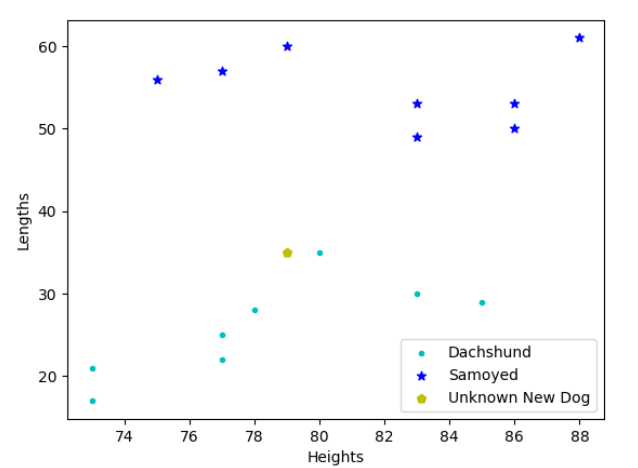
# KNN Algorithm 사용하기
# [length, height] : 형태로 만들기
dachshund_data:np.ndarray = np.column_stack((dachshund_length, dachshund_height))
dachshund_data_labels:np.ndarray = np.zeros(len(dachshund_data))
print(dachshund_data_labels) # Dachshund label : 0
#%%
samoyed_data:np.ndarray = np.column_stack((samoyed_length, samoyed_height))
samoyed_data_labels:np.ndarray = np.ones(len(samoyed_data))
print(samoyed_data_labels) # Samoyed label : 1
#%%
unknown_new_dog = [[79, 35]]
#%%
# Dachshund 와 Samoyed 데이터 합체하고 target 합체하기
dogs = np.concatenate((dachshund_data, samoyed_data), axis=0)
labels = np.concatenate((dachshund_data_labels, samoyed_data_labels), axis=0)
print(dogs)
print(labels)
print(dogs.shape)
print(labels.shape)

# 레이블 (0, 1) 로 선택되어 있는 값을 문자열로 쉽게 알 수 있도록 Dictionary type 으로 표현하기
dog_classes = {0:"Dachshund", 1:"Samoyed"}
k = 3
knn = KNeighborsClassifier(n_neighbors=k)
knn.fit(X=dogs, y=labels)
print(knn.classes_)
#%%
y_predict = knn.predict(X=unknown_new_dog)
print(y_predict)
#%%
print(y_predict[0])
#%%
print(dog_classes[y_predict[0]])


dachshund_length_mean = np.mean(dachshund_length)
dachshund_height_mean = np.mean(dachshund_height)

samoyed_length_mean = np.mean(samoyed_length)
samoyed_height_mean = np.mean(samoyed_height)

print(f'닥스훈트 평균 길이 : {dachshund_length_mean}')
print(f'닥스훈트 평균 길이 : {dachshund_height_mean}')

print(f'사모예드 평균 길이 : {samoyed_height_mean}')
print(f'사모예드 평균 길이 : {samoyed_length_mean}')

## 통계적 기반으로 데이터 증강식키기
new_normal_dachshund_length_data = np.random.normal(dachshund_length_mean,5.5,200)
new_normal_dachshund_height_data = np.random.normal(dachshund_height_mean,5.5,200)

new_normal_samoyed_height_data = np.random.normal(samoyed_height_mean,5.5,200)
new_normal_samoyed_length_data = np.random.normal(samoyed_length_mean,5.5,200)

print(new_normal_dachshund_length_data.shape)
print(new_normal_dachshund_height_data.shape)
print(new_normal_samoyed_length_data.shape)
print(new_normal_samoyed_height_data.shape)


plt.scatter(x=new_normal_dachshund_length_data, y=new_normal_dachshund_height_data, c='b', marker='.')
plt.scatter(x=new_normal_samoyed_length_data, y=new_normal_samoyed_height_data, c='m', marker='*')
plt.show()

# 새로운 데이터를 합성하고, 새로운 레이블 만들기
new_dachshund_data = np.column_stack((new_normal_dachshund_length_data, new_normal_dachshund_height_data))
new_samoyed_data = np.column_stack((new_normal_samoyed_length_data, new_normal_samoyed_height_data))
new_dachshund_label = np.zeros(len(new_dachshund_data)) # 200 [0...]
new_samoyed_label = np.ones(len(new_samoyed_data)) # 200 [1...]

new_dogs = np.concatenate((new_dachshund_data, new_samoyed_data), axis=0) # 400개의 (닥스훈트 + 사모예드)
new_labels = np.concatenate((new_dachshund_label,new_samoyed_label), axis=0) # 400개의 레이블

from sklearn.model_selection import train_test_split
(X_train, X_test, y_train, y_test) = train_test_split(new_dogs, new_labels,
                                                      test_size=0.2, random_state=0)
print(X_train.shape) # (320,2) 2는 컬럼의 수
print(X_test.shape) # (80,2)
print(y_train.shape) # (320,)
print(y_test.shape) # (80,)

knn = 5
knn = KNeighborsClassifier(n_neighbors=knn)
knn.fit(X_train,y_train)
print(f'훈련의 정확도 : {knn.score(X_train,y_train)}')

#예측
y_predict = knn.predict(X_test)
print(y_predict) # 예측값
print(y_test) # 정답 target, label

from sklearn.metrics import accuracy_score
print(f"테스트 정확도 : {accuracy_score(y_true = y_test,y_pred = y_predict)}")
# 과대(과잉)적합 및 과소적합을 판단할 수 있다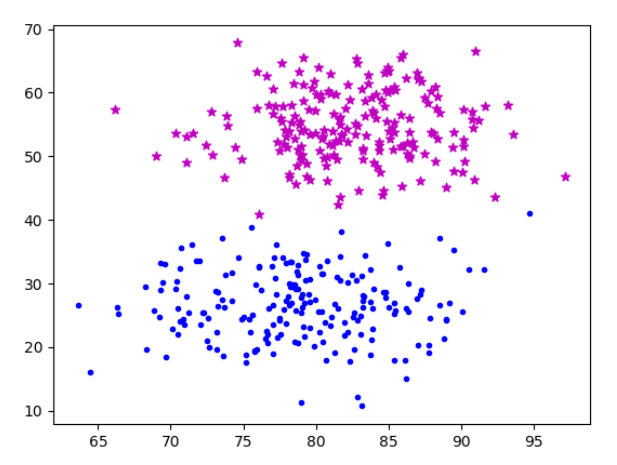

퍼셉트론
퍼셉트론이란 인공 신경망을 의미한다.
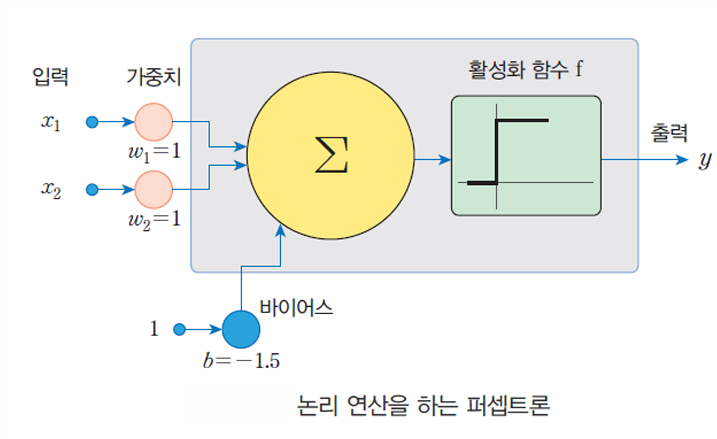
XOR 에 대한 퍼셉트론을 간단하게 코드로 구현해 보면 아래와 같다
import keras
import tensorflow as tf
model = tf.keras.models.Sequential(name="XOR")

model.add(tf.keras.layers.Dense(units=2, input_shape = (2,) ,activation='sigmoid',name='INPUT'))
model.add(tf.keras.layers.Dense(units=1, activation='sigmoid',name='OUTPUT'))
model.compile(loss='mse',optimizer=keras.optimizers.SGD(learning_rate=0.1))

X = tf.constant([[0, 0],[0, 1], [1, 0], [0, 0]])
y = tf.constant([0,1,1,0])
print(model.summary())
model.fit(X,y,batch_size=1,epochs=1000)
print(model.predict(X))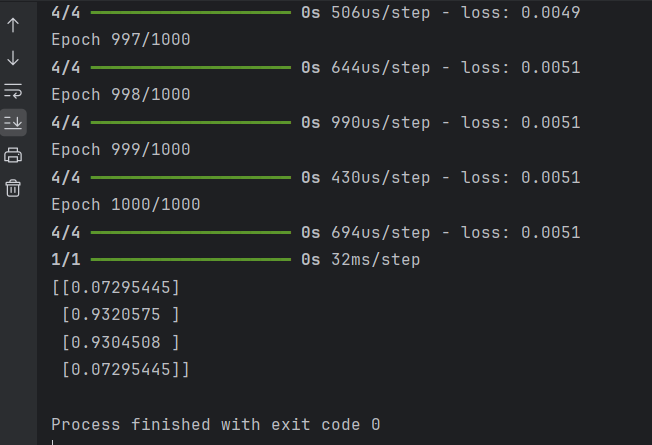
비선형 데이터 (2차 방정식 함수)를 학습
import numpy as np
import time
from matplotlib import pyplot as plt
SAMPLE_NUMBER = 10_000
np.random.seed(int(time.time())) # 시간에 따른 랜덤 시드

Xs = np.random.uniform(low=-2.0,high=0.5,
                       size=SAMPLE_NUMBER)
np.random.shuffle(Xs) # shuffle -> 섞기
print(Xs[:10]) # 그 중 10개만 확인

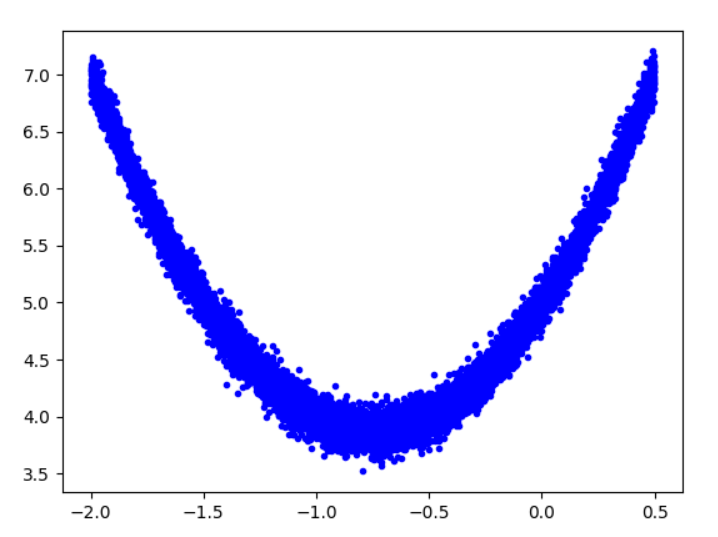
ys = 2 * np.square(Xs) + 3 * Xs + 5 # 2차 방정식 f(x) = 2x^2 + 3x + 5

plt.plot(Xs,ys,'r.')
plt.show()

ys += 0.1 * np.random.randn(SAMPLE_NUMBER)
plt.plot(Xs,ys,'b.')
plt.show()
# np.save('noise.npy',ys)
from sklearn.model_selection import train_test_split
(X_train, X_test, y_train, y_test) = train_test_split(Xs, ys, test_size=0.2)
print(X_train.shape,X_test.shape,y_train.shape,y_test.shape)

plt.plot(X_train,y_train,'b.',label='Train')
plt.plot(X_test,y_test,'r.',label='Test')
plt.legend()
plt.show()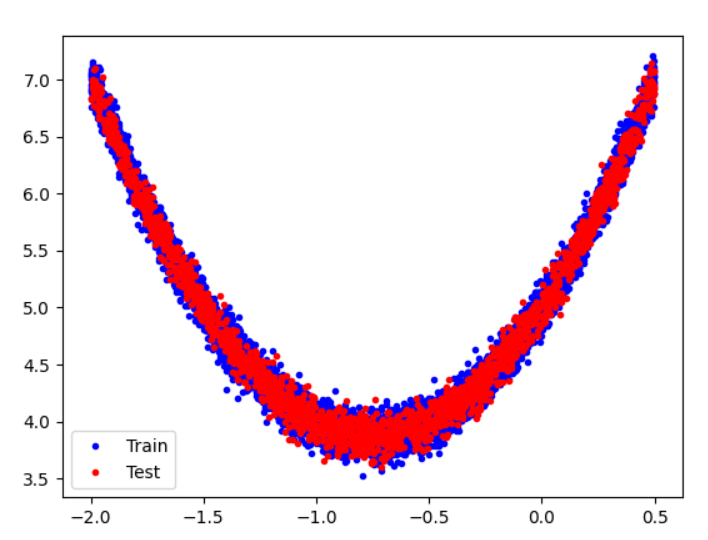
import tensorflow as tf
model = tf.keras.Sequential([],name = "Model")
Input_layer = tf.keras.Input(shape=(1,))
model.add(Input_layer) # 입력값 사이즈
model.add(tf.keras.layers.Dense(units=16,activation='relu',name='Layer1'))
# 다층구조 Dense Layer 안에는 Weight가 16개
model.add(tf.keras.layers.Dense(units=16,activation='relu',name='Layer2'))
# 두번째 층도 16개의 unit으로 동일하게 구성
model.add(tf.keras.layers.Dense(units=1,name='OUTPUT'))
model.summary()
model.compile(optimizer='adam',loss='mse')
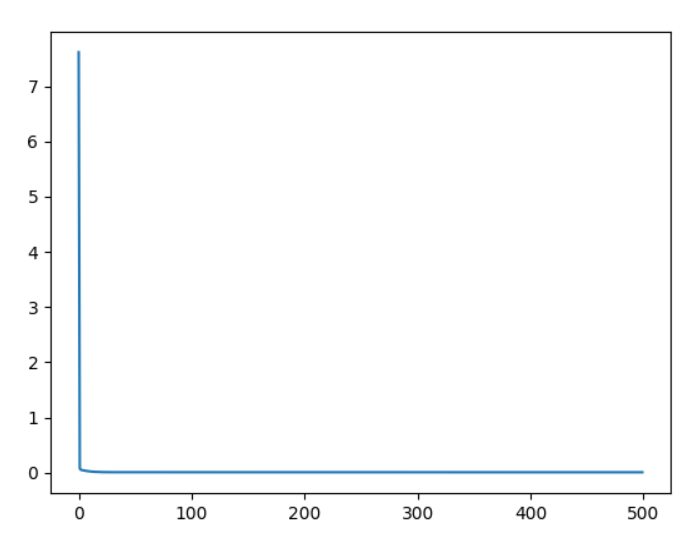
history = model.fit(X_train,y_train,epochs=500)
print(history.history['loss'])


y_pred = model.predict(X_test)
# print(f'최종 정확도 : {model.evaluate(y_test,y_pred)}'
# 해당 프린트 문의 evaluate 는  과거와 역할이 달라짐

plt.plot(y_test,y_pred,'r.')
plt.show()
plt.plot(history.history['loss'])
plt.show()
evaluate 구문 삭제 후 최종 정확도를 1- loss 로 계산
y_pred = model.predict(X_test)
loss = model.evaluate(X_test,y_test)
print(f'최종 정확도 : {1-loss}')

# -> accuracy 문제 : 1 - loss -> 정확도
# evaluate 에 대한 기능이 바꼈기 때문에 위와 같은 형태로는 작성할 수 없다
plt.plot(y_test,y_pred,'r.')
plt.show()
plt.plot(history.history['loss'])
plt.show()

'ABC 부트캠프' 카테고리의 다른 글
| [23일차] ABC 부트캠프 패션 데이터 및 CNN (0) | 2024.07.27 |
|---|---|
| [22일차] ABC 부트캠프 케라스 심화 (1) | 2024.07.26 |
| [20일차] ABC 부트캠프 ESG포럼&세미나 2번째 시간 (1) | 2024.07.21 |
| [19일차] ABC 부트캠프 머신러닝 - MachinLearning (0) | 2024.07.21 |
| [18일차] ABC 부트캠프 선형회귀 (0) | 2024.07.21 |
'ABC 부트캠프' Related Articles
more


