
Notice
Recent Posts
Recent Comments
Link
| 일 | 월 | 화 | 수 | 목 | 금 | 토 |
|---|---|---|---|---|---|---|
| 1 | 2 | 3 | 4 | 5 | 6 | |
| 7 | 8 | 9 | 10 | 11 | 12 | 13 |
| 14 | 15 | 16 | 17 | 18 | 19 | 20 |
| 21 | 22 | 23 | 24 | 25 | 26 | 27 |
| 28 | 29 | 30 |
Tags
- #abc 프로젝트 멘토링 #유클리드소프트 #고용노동부 #대한상공회의소 #미래내일일경험사업 #공부일지 #멘토링일지
- #abc부트캠프 #유클리드소프트 #고용노동부 #대한상공회의소 #미래내일일경험사업
Archives
- Today
- Total
나른한 코딩 생활
[22일차] ABC 부트캠프 케라스 심화 본문
지금까지 배웠던 내용들을 총정리 함과 동시에, 케라스를 이용한 몇가지 예시를 통해 코딩능력을 기르자
숫자 데이터 훈련
import matplotlib.pyplot as plt
import tensorflow as tf
(train_images, train_labels), (test_images, test_labels) = tf.keras.datasets.mnist.load_data()
print(train_images.shape) # (60000, 28, 28) //  28, 28 -> 이미지의 사이즈 (가로, 세로 개념과 비슷)
# -> 이러한 이미지가 60000개 존재 // tensor 3
print(train_labels.shape) # (60000,)
print(test_images.shape) # (10000, 28, 28)
print(test_labels.shape) # (10000,)
# 총 7만개의 데이터 중 6만개 -> train / 1만개 -> test
# 28 * 28 pixel = 784 pixel (화소)
# 2^8 = 256, 0~255 까지의 수를 가지며 255가 제일 밝은 흰색을 가진다
# 흰색을 객체로 인식하며 배경은 0으로 처리

plt.imshow(train_images[0],cmap="Greys")
# 60000개 중 인덱스 0번째 = train_images[0] 화면 처음 이미지 / Greys 스케일로 보여줌
# 보여지는 이미지는 색반전을 시킨 모델이다 -
# > 사용자의 편의성을 위하여 색반전으로 배경을 흰색, 객체를 검정색으로 보여줌
plt.show()
print(f'첫번째 이미지 : {train_labels[0]}') # 첫번째 이미지 : 5
print(test_images[0,1,1]) # 0  // black
print(test_images[0,15,7])
# pdf 177 pg

model = tf.keras.models.Sequential([],name = 'MODEL')
model.add(tf.keras.layers.Dense(units=512, activation='relu', input_shape=(784,),name='LAYER1'))
model.add(tf.keras.layers.Dense(units=10, activation='sigmoid',name='OUTPUT')) # 숫자 0~9까지 10개

model.summary()
model.compile(optimizer='rmsprop',loss='mse',metrics=['accuracy'])
# 1- accuracy = loss // accuracy = 1 - mse

# 오류 발생한다 ! -> 데이터 전처리 과정 필요


# 데이터 전처리 과정
train_images = train_images.reshape((60000, 784))
# 'reshape' 를 통해서 평탄화 작업
train_images = train_images.astype('float32') / 255.0
# 나누는 이유 : 255 값이 너무 크다
# 픽셀값을 255로 나눠줌으로서 해당 픽셀의 밝기 값을 0~1 사이로 만든다 => 0.0 ~ 1.0 사이값
test_images = test_images.reshape((10000, 784))
test_images = test_images.astype('float32') / 255.0

# train_labels 값은 이미 숫자형으로 0~9의 값을 가지고 있다
# 즉, 이미지가 아니라 전처리 과정이 불필요함


# 정답 레이블 형태 변경
train_labels = tf.keras.utils.to_categorical(train_labels)
test_labels = tf.keras.utils.to_categorical(test_labels)

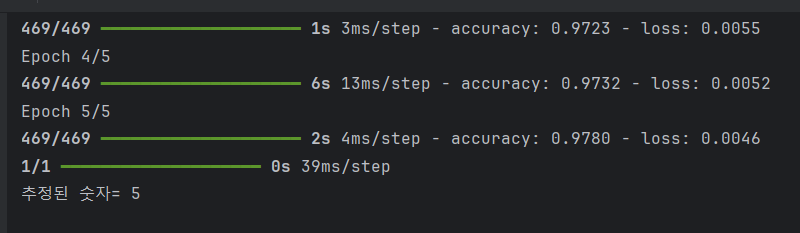
model.fit(train_images, train_labels, epochs=5, batch_size=128)

test_loss, test_acc = model.evaluate(test_images, test_labels)
print('테스트 정확도:', test_acc)


# 그래프 그리기
history = model.fit(train_images, train_labels, epochs=5, batch_size=128)
loss = history.history['loss']
acc = history.history['accuracy']
epochs = range(1, len(loss)+1)
plt.plot(epochs, loss, 'b', label='Training Loss')
plt.plot(epochs, acc, 'r', label='Accuracy')
plt.xlabel('epochs')
plt.ylabel('loss/acc')
plt.show()
비선형 데이터 학습
import pandas as pd
df = pd.read_csv(filepath_or_buffer='nonlinear.csv')
# print(df.head()) 데이터 확인

import matplotlib.pyplot as plt
X = df.iloc[:,0]
print(X.head(3))
y = df.iloc[:,1]
print(y.head(3))

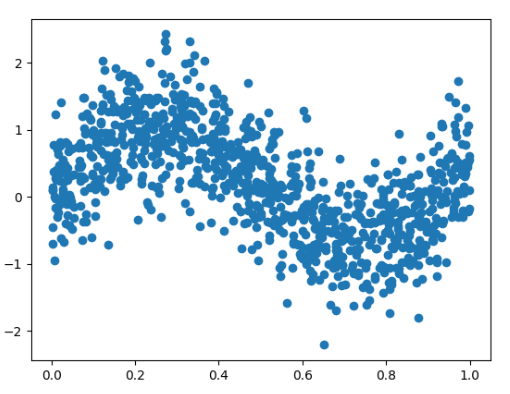
plt.scatter(X,y)
plt.show() # 비선형 , range(오차) 범위가 큼
LinearRange System
Knn -> 다른 종류의 데이터 2개가 필요함
DNN -> 3개
InputLayer : x값이 1개
OutputLayer : y값이 1개
import tensorflow as tf
model = tf.keras.models.Sequential([],name='MODEL')
input_layer = tf.keras.layers.Input(shape=(1,))
dense_layer1 = tf.keras.layers.Dense(units=6, activation='tanh',name='LAYER1')
dense_layer2 = tf.keras.layers.Dense(units=5, activation='tanh',name='LAYER2')
dense_layer3 = tf.keras.layers.Dense(units=4, activation='tanh',name ='LAYER3')
dense_layer4 = tf.keras.layers.Dense(units=1, activation='tanh', name='OUTPUT')
# 실습에서는 activation = sigmoid 였다
model.add(layer=input_layer)
model.add(layer=dense_layer1)
model.add(layer=dense_layer2)
model.add(layer=dense_layer3)
model.add(layer=dense_layer4)

model.summary()
model.compile(optimizer=tf.keras.optimizers.SGD(learning_rate=0.38), loss='mse')
# learning_rate (학습률)의 기본은 0.01 이다 // 1 미만의 값을 설정한다
# learning_rate 의 크기가 크면 손실률이 떨어지는게 크다


print(type(X))
print(type(y)) # X , y 둘다 pandas 타입

X = X.to_numpy() # pandas -> ndarray
y = y.to_numpy() # pandas -> numpy
print(X)
print(X.shape)
# (1000,) // tensor 1 인 경우 -> tensor 2로 바꾸는 것을 권장
# 암묵적인 룰로서 대문자 X 는 tensor 2 이상인 경우이다
print(y)
print(y.shape) # (1000,)

tf_X =X.reshape(1000,1)
# print(tf_X)
print(tf_X.shape) # (1000, 1)
model.fit(tf_X, y, epochs=2000)
# model.save('weights_2024_07_24.keras')
predict_result = model.predict(X)
plt.scatter(X,y,color='b')
plt.scatter(X,predict_result,color='r')
plt.show()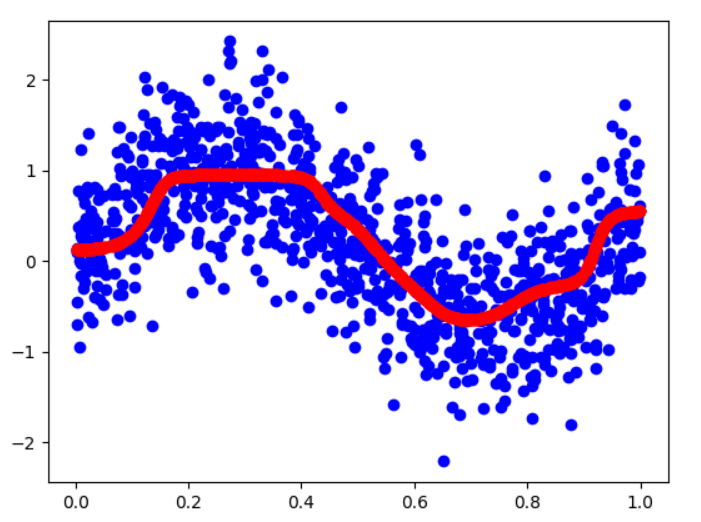
손실함수 / 옵티마이저 / 활성화 함수
1. 손실 함수 (Loss Function)
손실 함수는 모델의 예측 값과 실제 값 사이의 차이를 측정하는 함수. 모델이 얼마나 잘 작동하는지를 평가하는데 사용. 손실 함수는 모델이 학습하는 동안 최소화되어야 한다. 주요 손실 함수는 다음과 같음:
- Mean Squared Error (MSE): 회귀 문제에서 주로 사용되며, 예측 값과 실제 값의 차이를 제곱하여 평균을 구함.
- Cross-Entropy Loss: 분류 문제에서 주로 사용되며, 예측 확률과 실제 클래스 사이의 차이를 측정. 이진 분류에서는 Binary Cross-Entropy, 다중 클래스 분류에서는 Categorical Cross-Entropy를 사용.
2. 옵티마이저 (Optimizer)
옵티마이저는 손실 함수를 최소화하기 위해 모델의 가중치를 업데이트하는 알고리즘. 주요 옵티마이저는 다음과 같음:
- Stochastic Gradient Descent (SGD): 모든 데이터 포인트에 대해 기울기를 계산하고 가중치를 업데이트. 단순하지만 학습이 느리고, 지역 최소값에 빠질 수 있음.
- Adam (Adaptive Moment Estimation): 모멘텀과 RMSprop의 장점을 결합한 방법으로, 학습률을 적응적으로 조정하여 빠르고 안정적인 학습을 가능 함.
- RMSprop: 학습률을 적응적으로 조정하여 빠르고 안정적인 학습을 가능하게 함. 특히, 뉴럴 네트워크에서 효과적.
- 그 외 : Adadelta, Adagrad
3. 활성화 함수 (Activation Function)
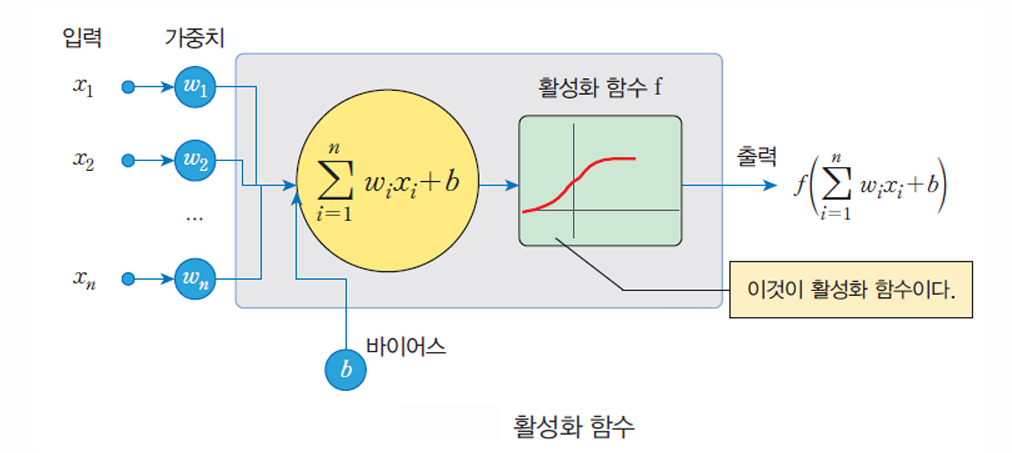
활성화 함수는 뉴럴 네트워크에서 입력 신호를 처리하여 출력 신호를 생성하는 함수. 뉴런의 출력 값을 비선형 변환하여 모델이 복잡한 패턴을 학습할 수 있도록 함. 주요 활성화 함수는 다음과 같다:
- ReLU (Rectified Linear Unit): 입력 값이 0보다 크면 그대로 출력하고, 0보다 작으면 0을 출력. 현재 가장 널리 사용되는 활성화 함수. ReLU(x)=max(0,x)\text{ReLU}(x) = \max(0, x)
- Sigmoid: 입력 값을 0과 1 사이의 값으로 변환, 주로 이진 분류 문제에서 출력 층에 사용. Sigmoid(x)=11+e−x\text{Sigmoid}(x) = \frac{1}{1 + e^{-x}}
- Tanh (Hyperbolic Tangent): 입력 값을 -1과 1 사이의 값으로 변환, 주로 중간 층에서 사용. Tanh(x)=ex−e−xex+e−x\text{Tanh}(x) = \frac{e^x - e^{-x}}{e^x + e^{-x}}
요약
- 손실 함수: 모델의 예측과 실제 값 사이의 차이를 측정 (예: MSE, Cross-Entropy).
- 옵티마이저: 손실 함수를 최소화하기 위해 가중치를 업데이트 (예: SGD, Adam).
- 활성화 함수: 뉴런의 출력 값을 비선형 변환 (예: ReLU, Sigmoid, Tanh).
원 핫 인코딩
import numpy as np
X = np.array([['Korea', 44, 7200],
              ['Japan', 27, 4800],
              ['China', 30, 6100]])
from sklearn.preprocessing import OneHotEncoder
onehotencoder = OneHotEncoder()
# 원하는 열을 뽑아서 2차원 배열로 만들어서 전달하여야 한다.
XX = onehotencoder.fit_transform(X[:,0].reshape(-1,1)).toarray()
print(XX)
X = np.delete(X, [0], axis=1) # 0번째 열 삭제
X = np.concatenate((XX, X), axis = 1)# X와 XX를 붙인다.
print(X)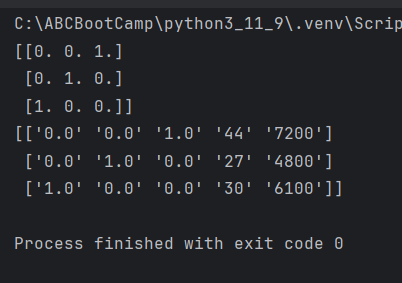
'ABC 부트캠프' 카테고리의 다른 글
| [24일차] ABC 부트캠프 이미지 필터링 및 학습 (0) | 2024.07.28 |
|---|---|
| [23일차] ABC 부트캠프 패션 데이터 및 CNN (0) | 2024.07.27 |
| [21일차] ABC 부트캠프 퍼셉트론 & MLP (3) | 2024.07.24 |
| [20일차] ABC 부트캠프 ESG포럼&세미나 2번째 시간 (1) | 2024.07.21 |
| [19일차] ABC 부트캠프 머신러닝 - MachinLearning (0) | 2024.07.21 |
'ABC 부트캠프' Related Articles
more


